
Sales & orders
Keep the customer, chosen products and order stage together. Follow progress from production to the warehouse, dispatch and delivery.
A clear answer for the customer. A clear next step for the team.
BUILT AROUND THE FURNITURE BUSINESS
Which order is in production, which item is reserved, which payment is outstanding? Follow the same work from customer to delivery with MOVENOM.
Store · Showroom · Warehouse · Management
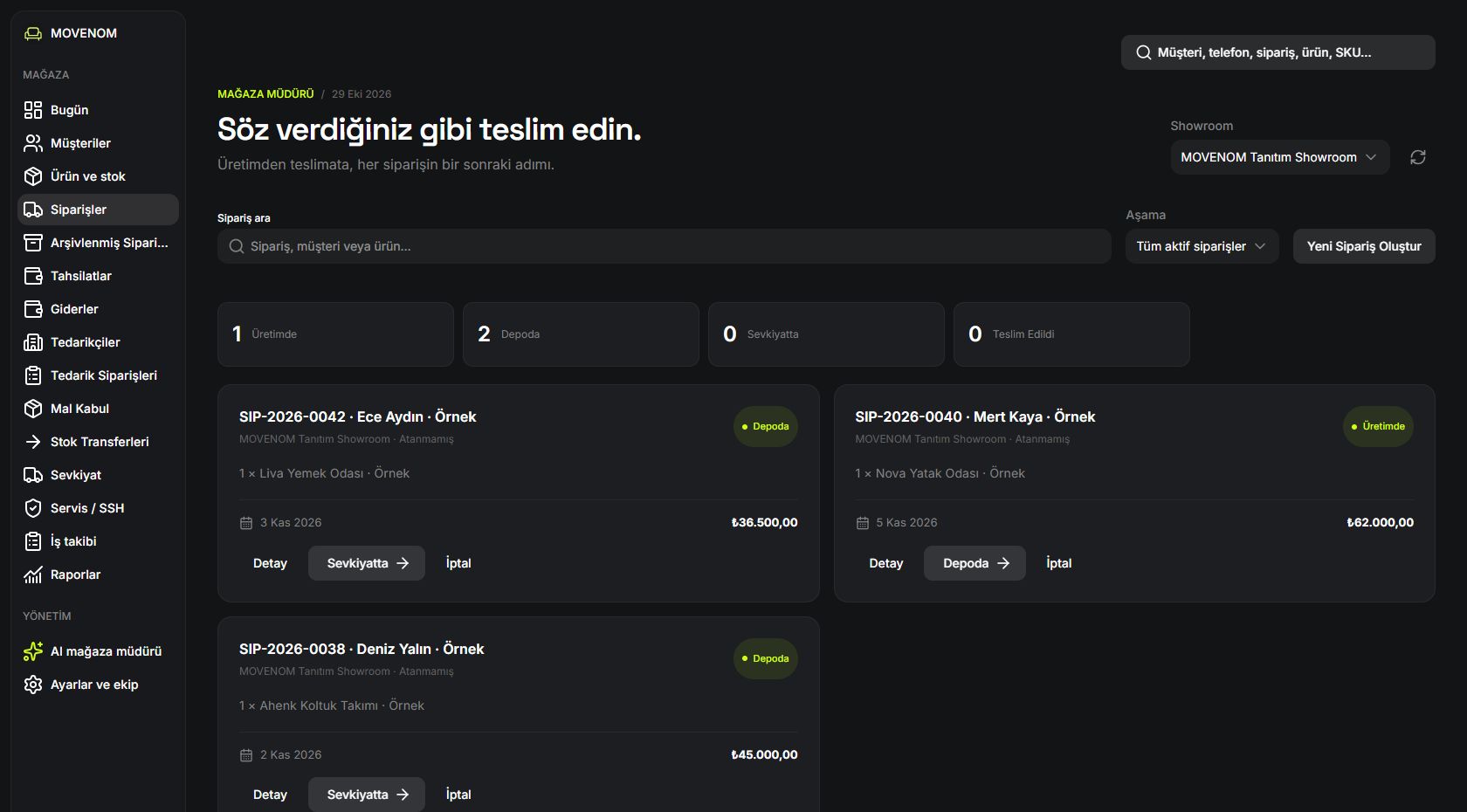
See which stage needs attention.
Separate available and reserved stock.
Track payments alongside the balance.
INSIDE THE PRODUCT
Products are chosen, stock is reserved, supply is awaited and deliveries are made. Payments may arrive in parts. MOVENOM connects these stages.
See production, warehouse and delivery stages. Keep products, dates and order totals together.
See physical, reserved and available quantities together. Know which items are already allocated to a customer.
Track recorded payments, outstanding balances and due dates. Keep receivables in view as orders progress.
Enlarge screen 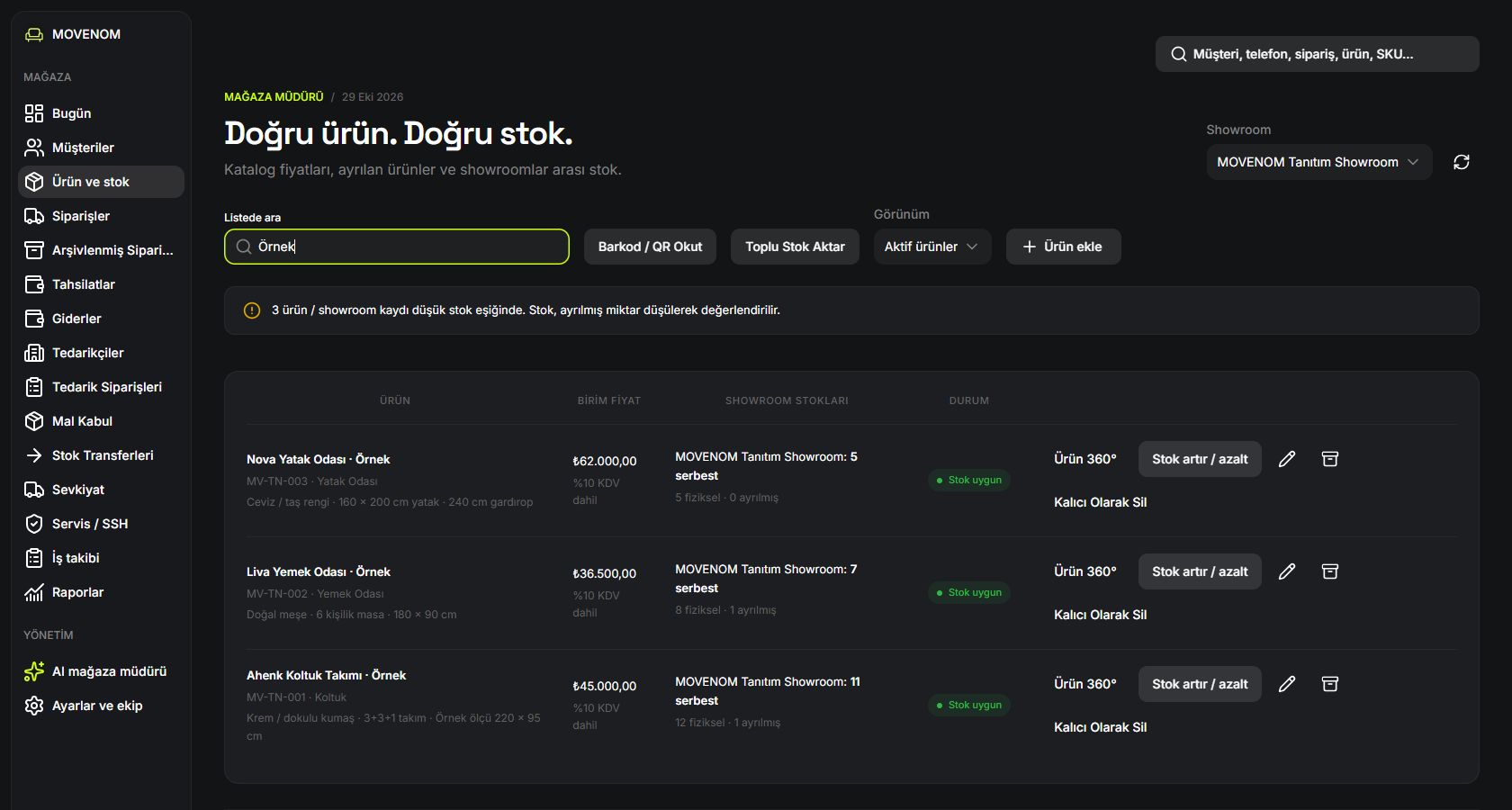 Enlarge screen
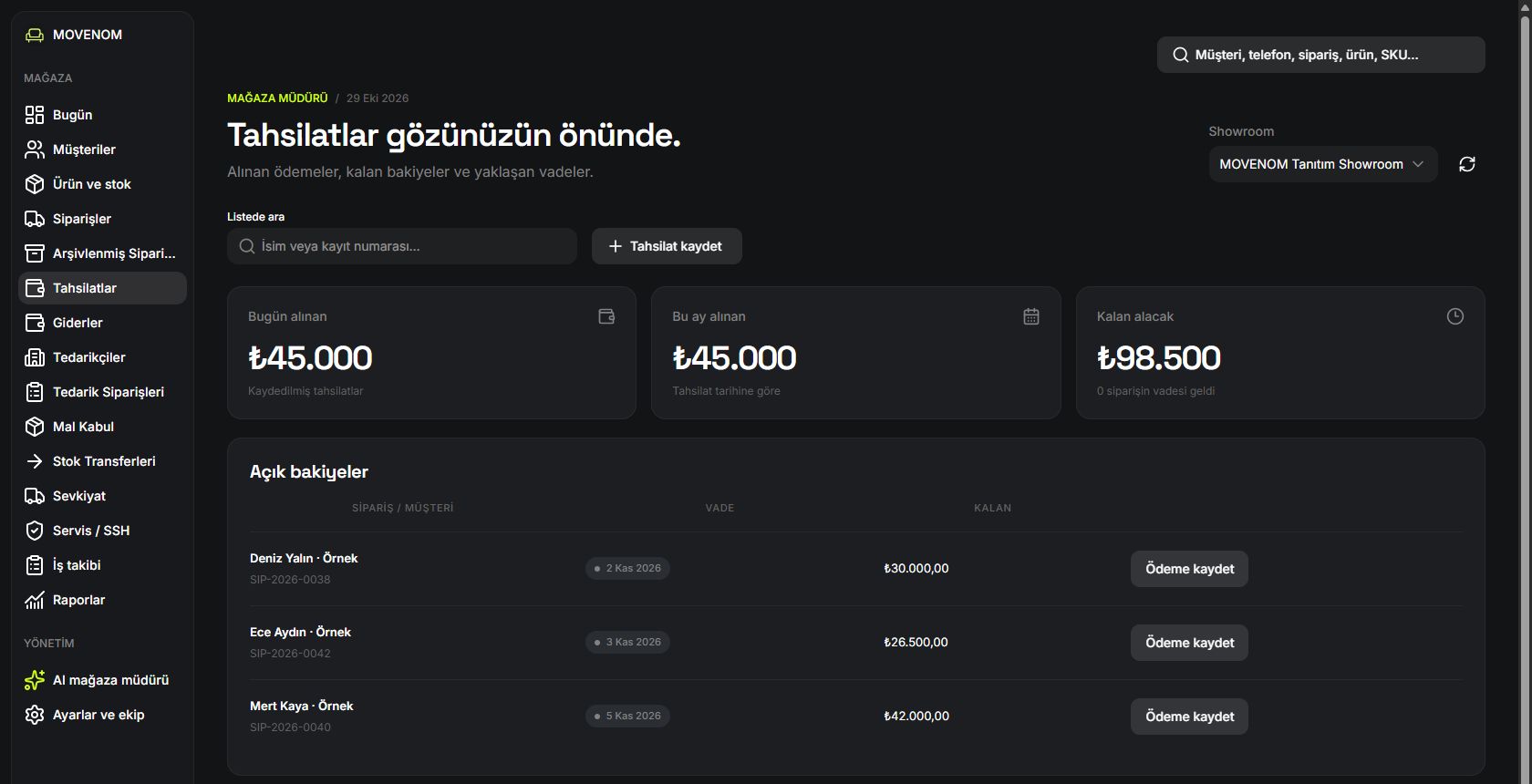 Enlarge screen
People, products and amounts shown are demonstration data. Interface shown in Turkish.
MOVENOM AI
From business data to daily priorities.
AI Store Manager answers order, stock and collection questions using authorized records from your business. Review daily priorities with your own data.
Illustrative AI scenarios · Not live responses
Helps you review follow-up priorities using order stages, pending supply and delivery information.
Helps you interpret physical, reserved and available stock for locations you are authorized to access.
Helps you review outstanding collections using order totals, recorded payments and remaining balances.
In BUSINESS and ELITE · Using authorized business records
BUSINESS: 300 requests/month · ELITE: 1,000 requests/month. AI outputs require user review.
THE WHOLE BUSINESS, IN ONE PLACE
Follow the same work across teams instead of disconnected lists. Explore the business processes MOVENOM brings together.
Keep the customer, chosen products and order stage together. Follow progress from production to the warehouse, dispatch and delivery.
Keep contact details, notes and order history in the customer profile. Continue discussing their needs instead of trying to reconstruct the last visit.
Distinguish physical, available and reserved stock. Reserve suitable central warehouse stock for a showroom order, even when the product is not on the showroom floor.
Track the selling showroom separately from the warehouse holding the product. View stock and operational information across your locations.
Keep the dispatch plan, address, products and delivery status connected. Link partial deliveries and after-delivery issues to the relevant order.
Follow the order total, payments received and outstanding balance together. Record expenses and keep sales value distinct from money collected.
Connect purchase orders with goods receipt. Distinguish partial deliveries from remaining quantities and keep the customer order linked to outstanding supply.
Link damage, missing parts and service needs to the customer and order. Follow open service cases, responsibility and resolution.
Set access around sales, warehouse and management responsibilities. Staff see authorised locations and actions; costs and profit remain restricted to those you permit.
Compare sales, products, locations and staff indicators. Keep revenue, cost and profit distinct rather than piecing together separate lists by hand.
Map your Excel/CSV columns, check products and locations, and preview the import. Choose whether to add to existing stock or replace the quantity.
From business data to daily priorities.
Explore the full scopeDIFFERENT ROLES. SHARED INFORMATION.
See customers and orders together. Check available stock during conversations and follow the next stage of each order.
Track stock and delivery from goods receipt to dispatch. Keep partial receipts and deliveries connected.
Review sales, collections, expenses and location indicators together. Delegate work while controlling access.
MOVENOM / Plans
Monthly, with no annual commitment. VAT included.
Choose your team and locations. The suggestion uses user, showroom and warehouse limits; compare AI scope in the plan cards.
Capacity for this scale: MOVENOM ONE
MOVENOM ONE
For one showroom
For businesses bringing daily work together in one showroom and one warehouse.
AI not included
Discuss this planMOVENOM BUSINESS
For growing stores
For growing teams managing several showrooms and warehouses together.
AI: 300 requests/monthSubject to plan and user permissions
Discuss this planMOVENOM ELITE
For larger teams
For businesses needing more locations and capacity for larger teams.
AI: 1,000 requests/monthSubject to plan and user permissions
Discuss this plan✓ Every plan includes orders, stock, customers, collection tracking, reports and after-sales service.
Create an account to start a free 14-day BUSINESS trial. Online purchasing and card payments are not yet available.
Excel/CSV import lets you map columns and review records. The first step is checking your file structure and the information you want to transfer.
Costs and margins require separate permissions. You decide which locations and actions each employee can access.
Subscriptions are monthly with no annual commitment. Ordinary voluntary business cancellation takes effect at the end of the paid period, without voluntary prorated refunds. Mandatory legal rights remain. Read the current subscription terms using the link at the bottom of this site.
Your 14-day BUSINESS trial starts when you create a new business account. No card is required, and the trial does not automatically become a paid subscription. Online purchasing and payments are not yet available.
The selling showroom and physical stock location are tracked separately. Authorized users can allocate suitable available stock to orders, within the location limits of the plan.
Link damage, missing parts and service needs to the customer and order. Track open cases, responsible staff and outcomes together.
MOVENOM
Tell us how many showrooms, warehouses and users you have, and which process takes the most time. Make the conversation about your business.